

TCPEye 1.0
TCPEye allows you to know all your active TCP and UDP connections in detail
Program info
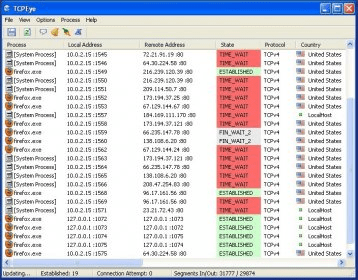
TCPEye allows you to know all your active TCP and UDP connections in detail. The program is capable of refreshing the connections list at the specified frequency and of notifying you via a message and/or a sound when a new connection has been established. Besides, you can also close any unwanted or suspicious connection and even kill its corresponding process directly from the program.
TCPEye basically consists of a very simple window where all your active TCP/UDP connections are shown. When you run it, the list is created and displayed automatically without the need of any intervention from you. It displays a really comprehensive set of information for every connection, including the opening process name and full path, the local and remote addresses and ports, the connection state, the remote country (including its flag!), the developer name of the opening program and its current version, among others. You are allowed to select which of the available columns to display or not.
There is also a set of parameters that you can configure to modify the program's behavior according to your needs. For example, you can set it to resolve the addresses and show their names when available, tell it to show unconnected endpoints (or not), or set the refreshing time interval. And, even more important, the program allows you to export your current active connection list into a disk file in text a format. Optionally, you can also set the program to append statistics to the end of this file.
Pros
- Refreshes your active connection list at the specified frequency
- Capable of notifying you when a new connection has been established
- Displays a very complete set of information about every active connection
- Allows you to close an open connection directly and even kill its corresponding process
- Capable of resolving IP addresses to display names rather than numeric addresses
- Allows you to export your current connection list to text format
Cons
- Poor visual design
- Includes a couple of commands to launch additional tools that are not included with the program
Details
Extensions

No information available
The data will be available later.Old versions

No information available
The data will be available later.


Comments